Stay safe. Follow procedures in the Operation Manual. Always use proper protective equipment, fully power down machines and use locks before service. Salford is not liable for injury or damage caused by improper maintenance or operation. Contact your Salford dealer for more information or support.
Need to replace the fan speed sensor on your 90-foot Salford air boom? This guide walks you through every step of the process, using insights from our detailed how-to video. These instructions cover Salford air boom applicators with a 10-inch Crary fan.
You’ll need:
- A 1 ¾-inch crow’s foot wrench
- Zip ties
- A new fan speed sensor
- Basic hand tools for bolt removal
Step-by-Step Instructions
1. Turn Off the Chassis
Before beginning your repair, make sure the machine is powered down completely and all power to the fan is disconnected. This is crucial before starting any disassembly.
2. Remove the Swing-Out Cooler Door
- Locate and remove the bolts, securing the cooler door.
- Swing the door open to access the impeller.
3. Disconnect the Sensor Cable
- Locate the sensor cable.
- Cut any zip ties holding the cable.
- Unplug the sensor and carefully pull the cable through the cooler housing.
4. Remove the Failed Sensor
- Use a 1 ¾-inch crow’s foot wrench to loosen the plastic nut holding the sensor and then remove the faulty sensor.
5. Install the New Sensor
- Mount the new sensor onto the bracket.
- Loosely tighten the nuts for now.
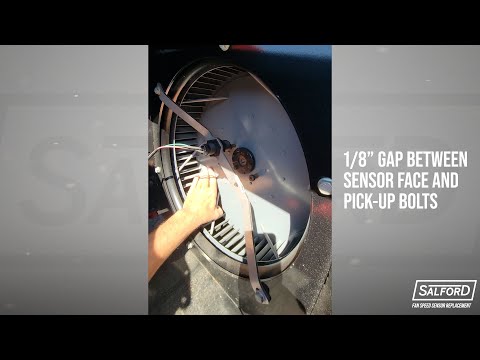
6. Set the Sensor Gap
- Adjust the sensor so the gap between the sensor face and impeller pickup bolts is approximately ⅛ inch.
- Tip: If you do not have a feeler gauge set, use a zip tie as a spacer to achieve the perfect gap.
- Once set, securely tighten the sensor nuts. Because the nuts holding the sensor are plastic, be sure not to over tighten and damage the nuts.
7. Reconnect Everything
- Route the cable back through the housing.
- Plug in the sensor.
- Secure the cable using new zip ties.
8. Close the Cooler Door
- Swing the cooler door back into place and reinstall the bolts.
Tips and Troubleshooting
- Sensor not reading? Double-check the gap distance — too close or too far will cause erratic readings.
- Wiring tip: Avoid sharp bends or tension when routing the cable.
- Zip tie tip: Always cut off the excess after securing the cable for a clean finish.
Replacing the fan speed sensor on your Salford 90-foot air boom is a quick and simple job if you follow these steps. Regular maintenance like this ensures your air boom runs smoothly and minimizes downtime.
For more detailed instructions, check out our YouTube video on the Fan Speed Sensor Replacement for 90-Foot Air Booms. Don’t forget to subscribe to our channel for more helpful videos.
For additional support, contact your Salford dealer or visit the Salford Connect Portal.